Copilot Chat for Outlook Mac

2025–2026 · Shipped in 2026

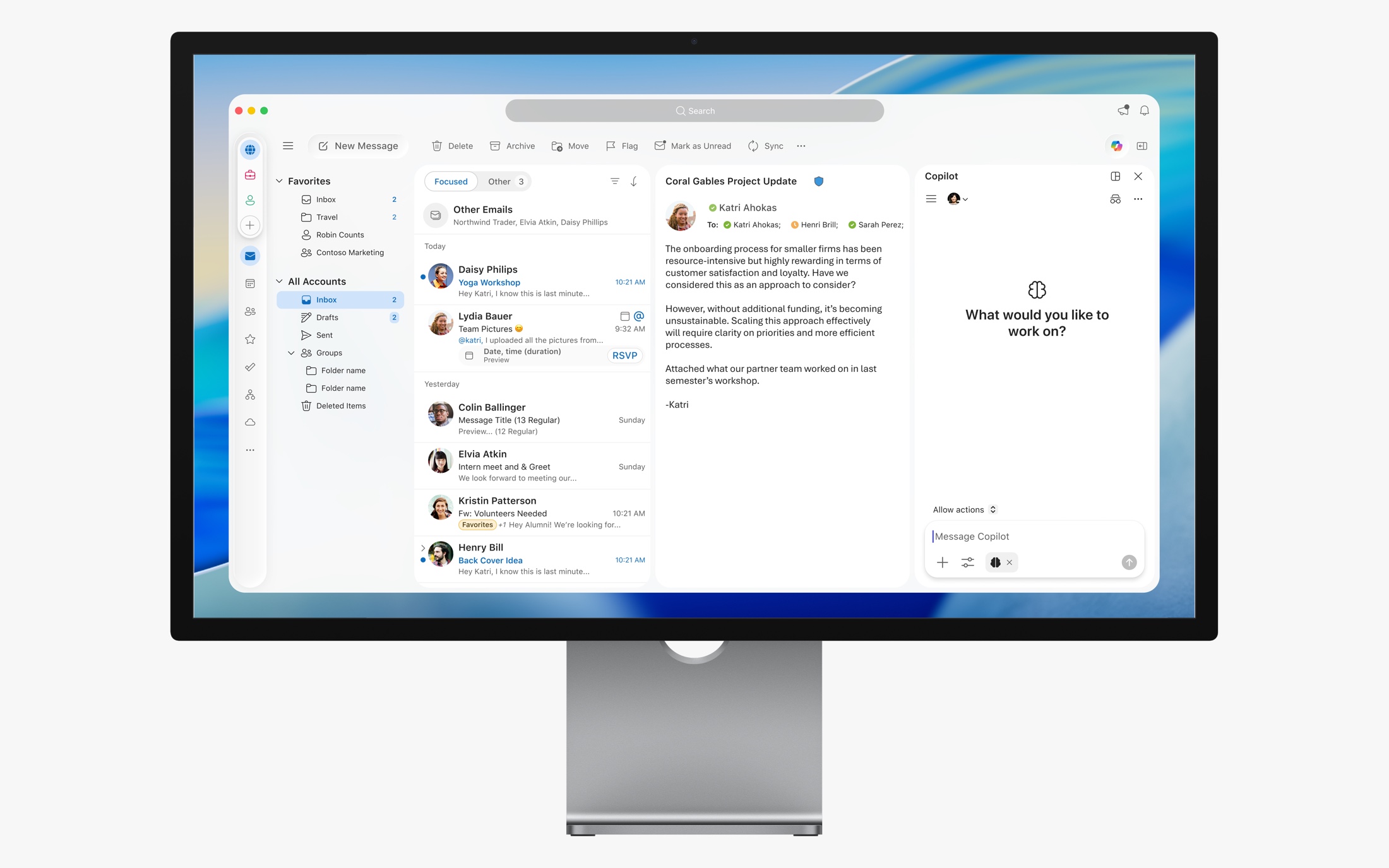
Copilot Chat integrated into the Outlook for Mac inbox and reading pane
Copilot Chat integrated into the familiar Outlook Mac experience.

About the project

Bringing Copilot Chat into Outlook Mac without taking over the workspace.

Bringing Chat into Outlook without making it feel out of place.

When Copilot Chat came to Outlook Mac, I was the first designer working on the Mac version. The Chat experience already existed, but its UI came from another team and didn't use the design system we'd built for Outlook Mac.

It looked different from the rest of the app. And while the traditional side pane worked, it took up a good amount of space that people needed for their email.

I was responsible for the Mac design: making the shared Chat experience feel native and finding ways for people to use it without giving up their workspace.

Rebuilding Chat with the Mac design system.

I redesigned the Chat interface using the components and patterns from the Outlook Mac Design System I'd built and maintained. It wasn't just changing colors. The controls, menus, spacing, layout, and interactions all needed to fit the rest of the app.

We still wanted the same Copilot experience people could find on other Outlook platforms. We just didn't think it had to look exactly the same on every device.

BEFORE · Shared Chat stylingApproved reference showing the original components and where they conflicted with native Outlook Mac patterns.
Starting point: a shared interface designed outside the Mac toolkit.
AFTER · Outlook Mac Design SystemShow native controls, typography, spacing, menus and Chat treatment in the shipped UI.
Native Mac components helped Copilot feel integrated with Outlook.

One chat, three ways to use it.

We heard that a full-height Chat pane could get in the way, especially when someone was trying to read and work through email. Rather than force everyone to keep that pane open, we worked on other ways to access Chat.

The side pane stayed for people who wanted Chat alongside their inbox. The Dynamic Action Bar (DAB) offered a smaller, quick-access chat from the top-right of the app. The pop-out window let people move Chat out of Outlook entirely and use the main window for something else.

The conversation carried across all three. You could start small and expand it later without losing what you'd already asked.

Side pane

For ongoing conversations that benefit from staying visible next to the inbox.

Dynamic Action Bar

A compact top-right entry point for quick prompts through a mini-chat, without keeping a full pane open.

Pop-out window

A detachable Chat surface that returns space to the main Outlook window and supports multitasking.

CHAT SIDE PANEShipped native side-pane screenshot.
Persistent companion.
DAB MINI-CHATShipped Dynamic Action Bar Chat entry and compact view.
Quick interaction.
POPPED-OUT CHATShipped detachable Mac Chat window.
Independent workspace.
INTERACTION DEMO · Preserve the conversationDemonstrate moving a single existing conversation between mini-chat, side pane, and pop-out without losing context.
The format could change without making users start a new conversation.

A moving conversation needed more than Figma.

Chat changes constantly. Responses arrive at different speeds, loading states appear and disappear, and the interface can move between a side pane and a separate window. Static frames couldn't show all of those details well enough.

I still used Figma for design and handoff, but I also started using LLM-assisted coding to build functional prototypes. I made prototypes for the side pane, the DAB mini-chat, the pop-out window, and the latency states.

That let me test the interaction myself and give engineering something they could actually run and respond to, instead of relying on a sequence of screenshots.

01Explore in Figma
02Prototype with AI
03Test behavior
04Review with engineers
05Refine & hand off
MOTION / PROTOTYPE · Chat latency behaviorShow real prototyped waiting, loading, and response interactions. Label actual states used; do not fabricate animations or state names.
Working prototypes conveyed timing and transitions more clearly than static frames alone.

The pop-out prototype became a starting point for engineering.

The pop-out Chat window started as something I wanted to experiment with. I used an LLM to build a working prototype in Swift and shared it with the engineer I was partnering with.

He liked the direction and told me that much of the code could be used as a starting point. That was the moment I realized a prototype I built for design exploration could also be useful to an engineer, not just as a visual reference.

We kept working on it together. He'd tell me what worked and what needed adjustment; I'd update the prototype, test the changes, and send it back. Engineering owned the production code, but the prototype gave us a common place to work from.

FROM EXPLORATION · AI-assisted Swift prototypeScreen recording or approved screenshot of your working detachable Chat prototype, including interaction details.
Functional prototype, created during design exploration.
TO SHIPPED · Native Mac pop-outThe corresponding production window, highlighting the parts refined with your engineering partner.
Engineering-owned production implementation, refined collaboratively.

Making the case for native code.

Working with several design and engineering teams was one of the harder parts of the project. Other teams were familiar with reusable web-based Chat UI, which would have been a simpler way to make every platform look the same.

Our Mac team kept pushing for native components. We believed it would better match the app and help with responsiveness, memory use, and package size. We worked through those tradeoffs with leadership, using prototypes, dogfooding, research, and ongoing conversations.

We eventually shipped a native experience that still worked like Copilot, but looked and felt right inside Outlook Mac.

DESIGN EVIDENCE · Native advocacyApproved dogfooding feedback, research artifacts, Mac component comparisons, or engineering prototype clips. Avoid unsupported numeric performance claims.
Demonstrations and collaboration helped teams align around a native implementation.

All three Chat experiences shipped in 2026.

We launched the native side pane, DAB mini-chat, and detachable Chat window in Outlook Mac, along with the Chat interaction states I'd worked on.

Existing Copilot users received the new native interface through the rollout. That tells us the redesign reached people already using Copilot; it isn't a measure of new adoption.

We saw relatively little use of the pop-out window. I was comfortable with that—it was meant to give people another option, not become the default way everyone chats.

What changed for the Mac experience.

After launch, our team saw improvements in how quickly Chat opened, its memory usage, and the size of the app bundle. I don't have verified before-and-after measurements for those changes, so I'd keep them as observations rather than attach percentages.

The clearest outcomes I can speak to directly are the native redesign, the three connected Chat surfaces that shipped, and the working Swift prototypes I used to collaborate with engineering throughout the build.

Native Mac Chat

Redesigned the borrowed interface around Outlook Mac's existing components.

Flexible Chat surfaces

Designed the side pane, DAB mini-chat, and pop-out experience, all shipped in 2026.

Code-backed design

Used working Swift prototypes to test behavior and work directly with engineering.

Using code made me a better design partner.

What I'm most proud of is how I worked with engineering. Chat was the first project where I really saw how useful AI-assisted coding could be in my day-to-day design work.

The pop-out started as a quick experiment, but the working prototype helped us make decisions together. I could change a behavior, test it, and show exactly what I meant. My engineer could tell me what was practical, and we could keep improving it from there.

Figma was still part of the process. Adding functional prototypes gave me another way to explain dynamic interactions and work faster with the people building them.