Compose with Copilot

Timeline: Dates to confirm

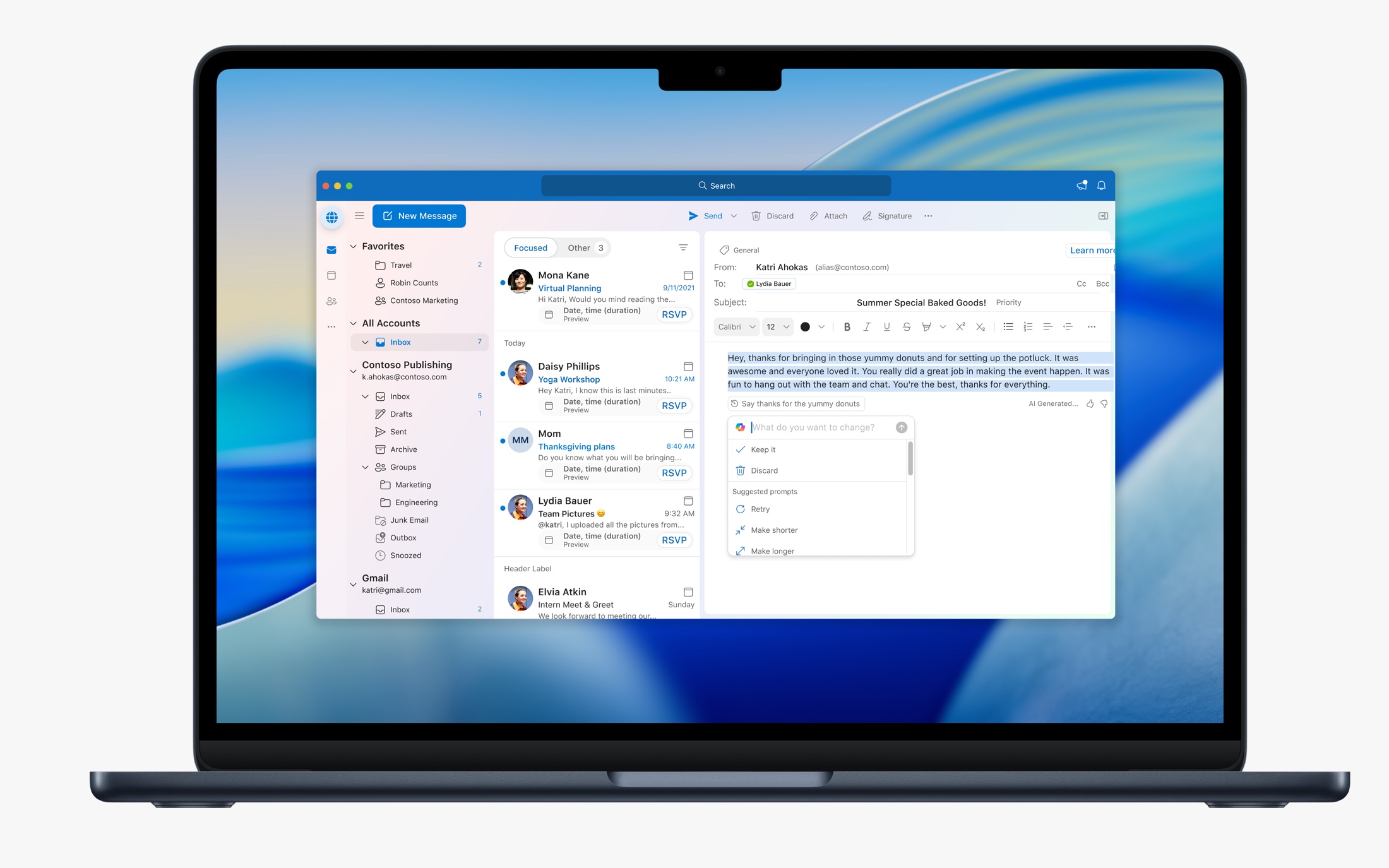
Outlook for Mac showing Compose with Copilot in the email writing surface
Compose with Copilot brings drafting and refinement directly into Outlook's writing surface.

About the project

Helping people start, write, and refine emails without leaving Outlook.

Writing an email can be harder than it needs to be.

We saw two common situations in Outlook. Some people spent their day answering similar emails. Others knew what they wanted to say but had a hard time getting started. Compose with Copilot was our way of making both tasks easier.

I joined as one of the first three designers on the project. I worked with the iOS and Windows (Monarch) designers on the main flows, then took responsibility for how the experience worked in Outlook Mac.

Early feedback surfaced another problem: Copilot could draft an email, but the result often didn't sound like the person sending it. Users would keep rewriting the output, sometimes to the point where writing it themselves felt faster.

The first draft often needed work.

What stayed with me from the early feedback was how often people said the draft didn't sound like them. Making the first draft faster didn't help much if they had to spend time fixing the tone afterward.

Later Polaris research reinforced that problem. It also showed that people liked being able to rewrite selected text but had trouble finding the feature. They wanted easier ways to compare versions before deciding what to keep.

Those findings gave us a clearer direction: make refinement easy to find, give people more control over the output, and don't make them start over each time they want a change.

Sound like me

Users wanted writing that sounded like their own voice.

Find the tool

People liked rewriting selected text, but often missed the entry point.

Stay in control

They wanted to see the original and the rewrite before choosing.

RESEARCH ARTIFACTApproved findings from Compass / Polaris research: tone, discoverability, comparison. Remove any sensitive participant details.
Research pointed us toward more visible controls and easier ways to revise a draft.

Keeping Copilot inside the email.

We explored placing Copilot in a separate chat and putting it directly in the email body. Chat was still new to many users, and Outlook Mac didn't have Copilot Chat at the time. We didn't want people to learn an entirely different workflow just to draft an email.

Across Mac, iOS, and Windows, we chose the on-canvas approach: a prompt box inside the composition surface. People could describe the email they wanted and stay where they were already writing.

That decision was shared across the platforms. My job was to make the Mac version look and behave like the rest of Outlook Mac.

EXPLORATION · Chat-oriented approachShow early Figma explorations with a brief note on tradeoffs.
Exploring a separate conversational model.
SELECTED · On-canvas interactionShow the prompt box placed directly in the email body.
Keep drafting in the familiar composition surface.

Making it easier to get to a draft worth keeping.

The first output usually wasn't the final one. So we made it possible to adjust tone and length before generating a draft, then change those settings again afterward. Users could also type a more specific follow-up instruction in the prompt box.

Just as importantly, they could accept the draft and keep writing on their own. Copilot was there to help, not to lock them into an AI workflow.

We also explored saved instructions and personal background to help Copilot better understand someone's writing style. Some explorations considered past email context with the user's permission. I would present those as explorations unless we confirm exactly what shipped.

PRODUCT FLOW · Tone, length, prompting, manual editUse real states showing the same draft moving through successive refinements.
Familiar controls offered both quick adjustments and open-ended iteration.

Making a slow response easier to follow.

Generation wasn't always quick. We tried both determinate and indeterminate loading states. In research, the determinate bar could feel stuck when it barely moved. The indeterminate animation gave a clearer sense that something was still happening.

I worked with our motion designers on loading and word streaming, so text could start appearing on the canvas while the rest of the email was being generated. Instead of staring at a loader, people could already begin reading.

When generation finished, the experience moved into reviewing, accepting, or refining the draft.

01Submit prompt
02Latency state
03Word streaming
04Review draft
05Accept or refine
MOTION PROTOTYPE · Loading + streamed writingUse an accessible MP4/WebM/GIF or still sequence of real explorations. Provide a reduced-motion alternative.
Progress feedback helped users understand an unpredictable generation process.

Rewrite only the part that needs help.

Not everyone was starting with a blank email. Sometimes someone had already written three paragraphs and only wanted help with one.

When users selected text, we showed a small Copilot icon—what we called the Skittle—in the left rail beside the selection. Clicking it opened a menu with Rewrite with Copilot, followed by the same familiar prompt box.

Copilot replaced the selected passage with a streamed rewrite. We also added an overlay where people could switch between the original and rewritten versions, decide which one to keep, or keep refining. The original wasn't lost just because they wanted to try something different.

01Select text
02Open Skittle
03Prompt rewrite
04Compare versions
05Keep or refine
5-FRAME INTERACTION · Highlight & RewriteShow original paragraph, left-rail Skittle, prompt, streaming rewrite, and original/rewrite carousel.
Contextual AI appears when useful without permanently cluttering the editor.

Making the shared experience feel right on Mac.

We had a lot of conversations about whether Copilot should look the same as the Windows version. I understood the reason for consistency, but I didn't want Mac users to feel as though we'd dropped a web experience into the middle of Outlook.

I used the Outlook Mac Design System I'd helped build for the prompt box, buttons, menus, spacing, animations, and editing states. Our team showed Mac-native and Windows-inspired options in prototypes and presentations. Comparative research also indicated that Mac users preferred the native styling.

We kept working with leadership and engineering until we had alignment. We still delivered the same Copilot capabilities across Outlook, but the Mac version used components and behavior that belonged in our app.

COMPARISON · Windows-inspired stylingUse approved internal explorations only.
The proposed cross-platform styling direction.
COMPARISON · Mac-native stylingShow use of the Outlook Mac Design System.
The direction aligned to established Mac patterns.

What we shipped and how we evaluated it.

Compose with Copilot went from early designs to a worldwide release. On Mac, the work included the on-canvas prompt, draft refinement, Rewrite with Copilot, loading and streaming interactions, and an interface built with our native design system.

My PM and I looked at thumbs-up and thumbs-down feedback as well as whether users kept their generated drafts. Those signals helped us understand whether Copilot was actually useful, not just whether someone tried it.

Over time, we saw more people keep their first drafts. Improvements to the underlying model and response speed happened alongside design changes, so I wouldn't claim that any one control caused that shift. I don't have a Mac-specific before-and-after figure to publish.

On-canvas Compose

Helped establish the shared writing flow and designed its native Mac implementation.

Draft refinement

Worked on tone, length, follow-up prompting, and the Rewrite with Copilot experience.

Native Mac design

Brought the experience into the Mac design system through exploration, research, and team alignment.

No product-wide usage figures are shown here because they do not isolate these designs or my contribution. Draft acceptance trends are described qualitatively until directly attributable, platform-specific measurements are available.

Keeping it familiar, even when the technology was new.

What I'm most proud of is the work we put into keeping Copilot native to Mac. It would have been easier to use the same visual treatment everywhere, but we kept making the case for an experience that felt like part of Outlook.

I also learned how important it is to design the second and third step, not just the first generation. The work isn't done when Copilot produces text. It's done when the person can turn that text into an email they're comfortable sending.